How-to guides
OctaFX (Elev8) Demo Account: How to Open & Use It (2026)
What a demo account is, how to open one free, which platforms it works on, and where its limits are — from an account we opened ourselves.

 Reviewed by TalhaUpdated 2026-07-07
An OctaFX (now Elev8) demo account is free, funded with virtual money, and lets you trade the live market without risking a cent. It's the safest way to learn the platform, test a strategy, and get comfortable before you fund a real account (minimum from $25). Below is what a demo is, how to open one in a couple of minutes, which platforms it runs on, and — just as important — where a demo stops being realistic.
Contents
Want to try a demo first?
Opening an OctaFX (Elev8) account is free and takes about 3 minutes — then create a demo from the Dashboard and practise with virtual funds before you risk a cent.

📢 OctaFX is now Elev8 — same broker, same account. You’ll see the Elev8 name and logo after you click.
Open OctaFX (Elev8) account →Trading forex/CFDs carries significant risk. This is general information, not financial advice.
What an OctaFX demo account is
A demo (or "practice") account is a full trading account loaded with virtual funds instead of real money. You place buy and sell orders against genuine live prices, watch your virtual balance rise and fall, and use the same charts and tools you'd get on a funded account — but nothing you win or lose is real. It exists so you can learn how the broker's platform works and test ideas before any of your own money is at stake.
OctaFX — now trading as Elev8 after its February 2026 rebrand — offers a free demo account. Per Elev8's own help documentation, you open one straight from the Dashboard by creating a new account and choosing "Demo" instead of "Real". There is no deposit required and no obligation to ever fund a live account. It's genuinely free to try.
One honest note on the virtual balance: the broker sets a starting virtual amount for demo accounts, but we're not going to quote a specific figure here, because we couldn't verify one exact number in the broker's official sources. Treat it as "virtual funds" and check the amount shown when you actually create the account.
How to open a demo account (step by step)
Opening a demo takes a couple of minutes and needs far less than a real account — you don't have to complete full ID verification (KYC) just to practise. Based on Elev8's published account-creation steps, the flow is:
- Register. Create an account with your email on the broker's registration page. This gives you a Dashboard (Personal Area).
- Open the "Create Account" panel inside the Dashboard.
- Choose a trading platform — MT4, MT5 or OctaTrader (Elev8Trader).
- Select "Demo" (rather than "Real").
- Start trading with virtual funds. Your demo appears in the Dashboard immediately and you can log into the platform with the credentials it generates.
That's it — no deposit, no card details. You can also create more than one demo if you want to test different platforms or strategies side by side. Exact wording and screens follow the broker's published terms, so confirm the labels live when you're in your account.
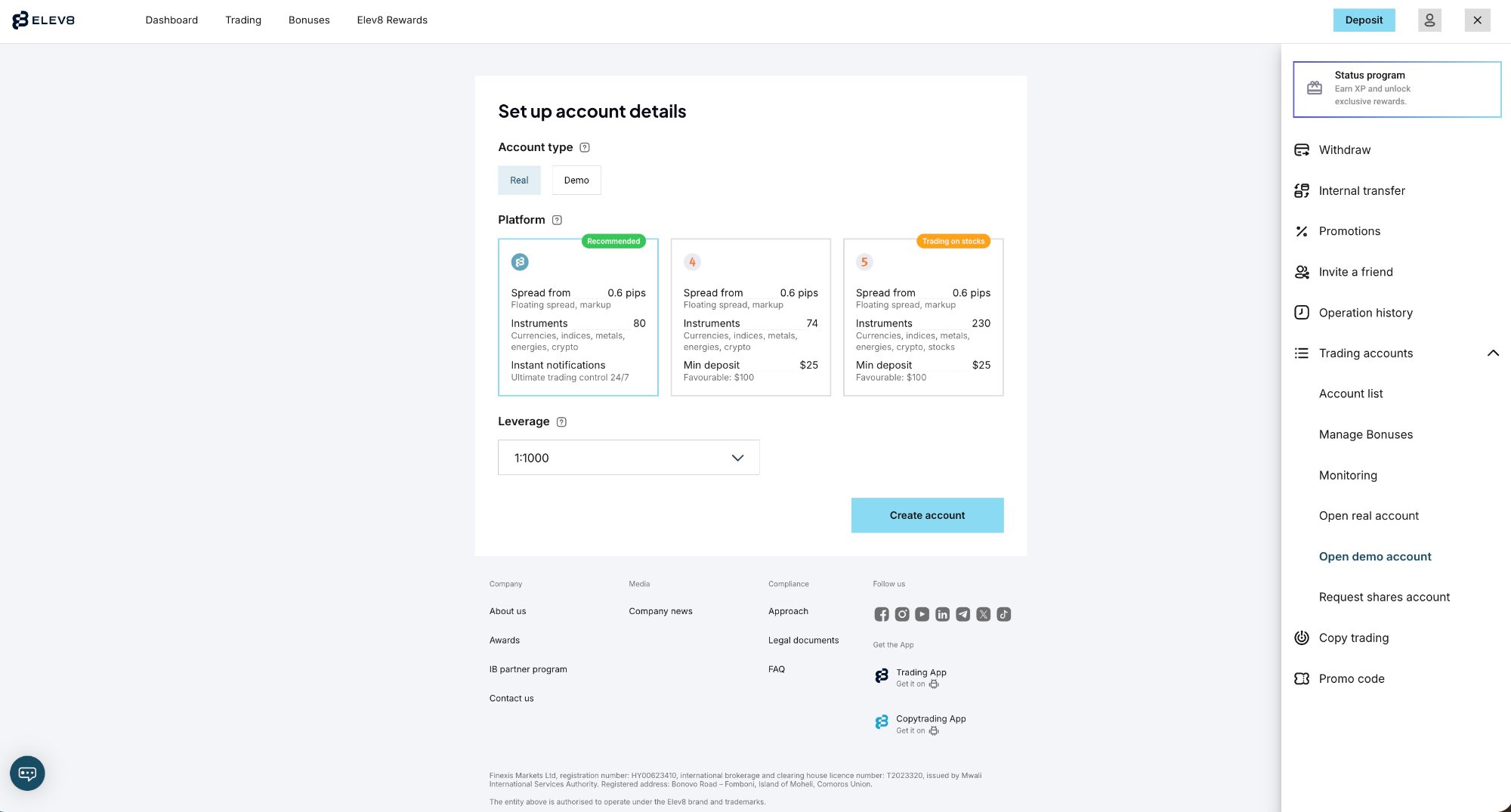
Which platforms the demo works on
The demo isn't limited to one platform — you can practise on any of the broker's trading platforms, which is useful because each one feels different and you'll want to know which suits you before committing real money.
| Platform | Type | Good for a demo user because… |
|---|---|---|
| MetaTrader 4 (MT4) | Desktop / web / mobile | The industry-standard classic; great for testing Expert Advisors and simple manual setups |
| MetaTrader 5 (MT5) | Desktop / web / mobile | More instruments and timeframes than MT4; newer order types |
| OctaTrader (Elev8Trader) | Proprietary web + app | The broker's own platform — cleaner, beginner-friendly interface; where copy trading lives |
Platform list per the broker's published terms. Under Elev8, the proprietary OctaTrader platform is referred to as "Elev8Trader" in some regions — same platform, new name.
If you're brand new, the proprietary OctaTrader/Elev8Trader interface is usually the gentlest starting point. If you already know MetaTrader, spin up a demo on MT4 or MT5 and skip the learning curve.
What a demo is good for
Used properly, a demo account is one of the most valuable free tools a beginner has. It's genuinely worth spending time in before you deposit. The main uses:
- Learning the interface. Placing orders, setting stop-loss and take-profit, reading the charts, and finding the deposit/withdrawal screens — all without the pressure of real money.
- Testing a strategy. Run your trading idea across different market conditions and see whether it actually holds up over dozens of trades, not just one lucky one.
- Checking execution and tools. See how fast orders fill, how the spread behaves on the pairs you care about, and whether the platform's indicators and features do what you need.
- Trying copy trading risk-free. The broker offers copy trading (OctaTrader Copytrading / Elev8 Copy); a demo lets you understand how it works before you allocate real funds to a Master Trader.
- Building a routine. Practising position sizing and sticking to a plan is a habit — a demo is where you build it cheaply.
One tip: treat the virtual balance as if it were real. Over-sizing trades "because it's only demo money" teaches you the opposite of what you want to learn.
The limits of demo trading
Here's the part a lot of broker-side guides skip. A demo is excellent for learning mechanics, but it is not a perfect rehearsal for live trading — and pretending otherwise sets beginners up to fail. The real differences:
- The emotions are different. Losing virtual money doesn't sting; losing real money does. Fear and greed change how you behave, and that's exactly what a demo can't simulate. Many traders who are consistently profitable on demo struggle the moment real money is involved.
- Execution can differ. On a real account you may see slippage (your order filling at a slightly different price) and spread widening during volatile news — effects that demo environments often smooth over.
- No withdrawal reality. A demo tells you nothing about the funding and withdrawal experience, which for this broker is a genuine consideration: small withdrawals are widely reported as fast, but a recurring complaint across review sites is around larger withdrawals and extra verification steps. A demo won't expose any of that.
- It can breed overconfidence. A great demo run is not proof you're ready to trade live. It's proof you understand the buttons.
The honest way to use a demo: learn the platform and prove your strategy has a logic to it — then move to a real account with a small amount you can afford to lose, and expect your results to be worse at first while you learn to handle real emotion.
Moving from demo to a real account
When you're comfortable, switching to a live account is straightforward — you don't create a whole new profile, you just add a Real account inside the same Dashboard and fund it.
- Complete verification (KYC). Unlike a demo, a real account needs ID and proof of address before you can deposit and withdraw.
- Create a Real account in the Dashboard (the same panel you used for the demo — choose "Real" this time).
- Make your first deposit. The minimum is from $25 and varies by payment method and region; the deposit screen shows the exact figure for your method. See our OctaFX minimum deposit guide for the full breakdown.
- Start small. Your first live trades should be sized so a loss is survivable — the goal is to bridge the emotional gap the demo couldn't teach you.
Bottom line
The OctaFX (Elev8) demo account is a free, no-risk way to learn the platform, test a strategy, and try copy trading with virtual funds on MT4, MT5 or OctaTrader — no deposit or ID verification needed to start. Use it, and treat the virtual money seriously.
Just don't mistake a good demo run for readiness. Real emotion, slippage and the funding/withdrawal experience are things only a live account teaches. When you're ready, verify, open a real account (from $25), and start small. And because regulation here is offshore rather than tier-1, never fund more than you can afford to lose.
The broker in this guide
Commission-free trading, copy trading, MT4/MT5 and OctaTrader. Minimum deposit from $25 (varies by method). Offshore-regulated (Mwali/Comoros) — read our full review before you decide.
Open OctaFX (Elev8) account →FAQ
Is the OctaFX (Elev8) demo account free?
Yes. The demo account is free, funded with virtual money, and requires no deposit and no obligation to open a real account. You can create it straight from the Dashboard after registering.
How much virtual money does the demo start with?
The broker sets a starting virtual balance for demo accounts, but we couldn't verify one exact figure in official sources, so we won't quote a number. You'll see the amount when you create the demo in your account. Treat it as practice funds.
Do I need to verify my identity to open a demo?
No. Full ID verification (KYC) is required for a real account so you can deposit and withdraw, but you can open and use a demo to practise without completing it.
Can I practise on MT4, MT5 and OctaTrader with a demo?
Yes. When you create the demo you choose a platform — MetaTrader 4, MetaTrader 5, or the proprietary OctaTrader (called Elev8Trader in some regions). You can create separate demos to try each one.
When should I move from demo to a real account?
Once you understand the platform and your strategy shows consistent logic on demo. Then fund a real account — from $25, varying by method — with a small amount you can afford to lose, and expect real emotion to change your results at first.
Ready to practise, then go live?
Open a free account, create a demo to learn the platform, and switch to a real account (from $25) whenever you're ready.
📢 OctaFX is now Elev8 — same broker, same account. You’ll see the Elev8 name and logo after you click.
Open OctaFX (Elev8) account →Trading forex/CFDs carries significant risk. This is general information, not financial advice.